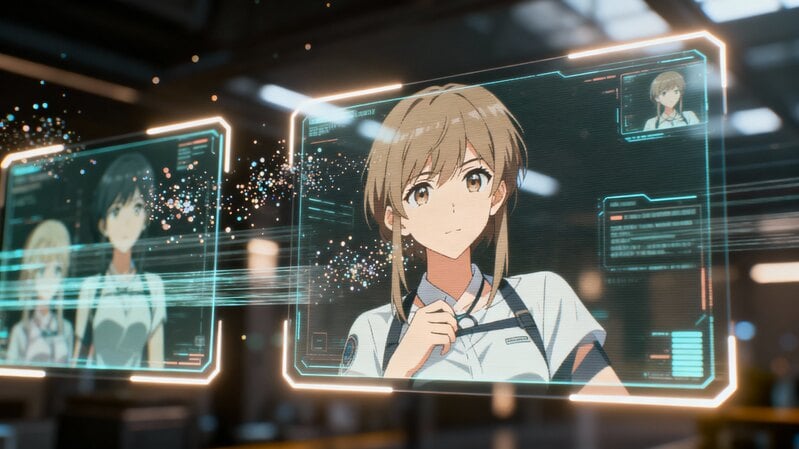
Have you considered designing your own unique VTuber persona? Many aspiring creators face the initial challenge of visual identity without prior artistic training. This guide explores how beginner graphic design courses provide the foundational skills needed to create a compelling avatar from scratch.
Understanding VTuber Avatars and Their Design Elements
Avatar styles: The three most common designs are anime-inspired, semi-realistic, and chibi. Anime-style avatars dominate the VTuber space because of their expressive eyes and stylized proportions, while semi-realistic avatars appeal to audiences who prefer lifelike visuals. Chibi designs, on the other hand, are known for their exaggerated cuteness and simplicity.
Key design elements: Your VTuber's face structure, expressions, hairstyle, clothing, and accessories work together to communicate personality. A color palette should align with your theme—cool tones for a calm character, vibrant hues for energy, or muted shades for a mysterious aura. Remember, consistency in design ensures viewers recognize your brand instantly.
The Role of Design in VTuber Avatar Creation
Your VTuber avatar serves as your digital identity and primary connection with viewers. A well-designed character communicates personality and brand values instantly. This visual representation becomes synonymous with your channel's content.
Avatar design requires careful consideration of facial expressions and body language. These elements must translate emotions clearly during live streaming sessions. Consistent visual appeal helps build audience recognition and loyalty.
Professional avatars often incorporate unique accessories or color schemes. These distinctive features help your character stand out in a crowded space. Memorable design elements contribute significantly to channel growth and recognition.
Software You Need for VTuber Avatar Design
Choosing the right tools can dramatically influence your workflow and the final look of your avatar. While professionals may use multiple programs, beginners should start with one or two versatile applications.
Adobe Photoshop remains the industry standard for 2D design. It offers extensive brush control, layer management, and effects that help refine details like shading and texture. However, the monthly subscription may not suit everyone.
Clip Studio Paint is widely praised among VTuber artists for its intuitive interface and affordability. It is optimized for drawing characters and managing layered illustrations, making it ideal for 2D avatar creation.
Live2D Cubism is essential if you plan to animate your 2D avatar. After drawing in Photoshop or Clip Studio, you can import layered files into Cubism to assign movement and facial expressions.
Blender is the best choice for 3D VTuber models. It supports modeling, rigging, and animation—all for free. While the learning curve is steep, online tutorials make it more accessible to beginners than ever before.
Krita is an excellent free alternative for sketching and coloring. It provides professional-grade tools, customizable brushes, and layer-based editing suitable for initial design stages.
Essential Graphic Design Skills for VTuber Avatar Creation
Before jumping into complex design software, you should master basic graphic design concepts. These skills form the foundation of any successful avatar design.
Balance and proportion: A balanced design avoids overcrowding one side of the composition. Proportion ensures that your avatar’s features—eyes, nose, and mouth—look harmonious.
Contrast and harmony: Learning how to combine light and dark values helps highlight key features. Harmony keeps all colors and shapes working together cohesively.
Color theory: Understanding complementary and analogous color schemes will make your character more appealing. For instance, a blue outfit may contrast beautifully with orange hair, creating visual interest.
Typography and logos: If you plan to stream or post videos, consistent font choices and logo design enhance your branding.
Digital tools: Using a drawing tablet improves line accuracy and natural stroke movement, a crucial skill for drawing fine details and expressions.
Step-by-Step Guide: From Concept to Avatar
-
Plan your concept: Start by defining your VTuber’s personality. Are they cheerful, mysterious, or adventurous? Gather references that reflect this identity.
-
Sketch your base: Use simple shapes to outline the head, body, and key features. Keep layers organized by labeling them.
-
Add details: Design the hairstyle, outfit, and accessories. Ensure that each layer (eyes, mouth, hair) is separate for easier animation later.
-
Choose your color palette: Select a few base colors and maintain consistency throughout. Avoid overusing gradients or filters that may complicate rigging.
-
Prepare for rigging: When your 2D design is complete, export each layer in PSD format for Live2D Cubism. For 3D avatars, use Blender to define bones and mesh movement.
-
Test expressions: Create variations for emotions such as happiness, sadness, or surprise.
Community Resources and Feedback Channels
Learning graphic design and avatar creation becomes easier when you are part of a community. Many online platforms provide feedback, tutorials, and collaboration opportunities.
Reddit hosts several useful communities like r/VTubers and r/CharacterDesign, where you can share progress and receive critiques.
Discord servers dedicated to VTuber development offer live workshops, mentorship sessions, and peer feedback.
ArtStation allows you to publish your finished avatars and build a portfolio, helping you attract commissions or collaborations.
Turning Your Skills Into a Personal Brand
Once your avatar is complete, the next step is transforming it into a recognizable brand. Your visual identity is your most powerful asset in the VTuber world.
Maintain consistency: Use your avatar’s color scheme in stream overlays, logos, and banners. Keep fonts and themes uniform across all platforms.
Engage with your audience: Build connections through storytelling. Whether your VTuber is an energetic gamer or a calm artist, consistent personality expression helps viewers relate to you.
Expand your brand: You can offer avatar design commissions, create tutorials, or sell art-related merchandise. These ventures not only diversify income but also strengthen your reputation in the digital art community.
 A Practical Guide to Financial Growth Through Passive Income Online
- 3Dキャラクターアニメーションでキャリアを築くための初心者ガイド
- A Complete Guide to Work From Home Packaging and Labeling
- Organize Your Workspace: Smart Packaging and Labeling Ideas to Enhance Focus
- How to Start Your Own Business from Home: A Comprehensive Guide




- Job & Education
A Practical Guide to Financial Growth Through Passive Income OnlineFor people aiming to strengthen their finances, online passive income has become an appealing path. Using approaches like affiliate promotions, self-paced digital classes, and blog-based publishing, it is possible to earn revenue that does not depend on constant daily labor. Beyond the monetary upside, this model can free up more time for meaningful work and personal interests. Looking into different online income channels is a practical first step toward greater financial flexibility built around your talents and goals.- Job & Education
3Dキャラクターアニメーションでキャリアを築くための初心者ガイドキャラクタークリエイターは、現代メディアの視覚的アイデンティティを形作る上で重要な役割を果たしています。すべてのヒーロー、クリーチャー、アバターはアイデアとして始まり、デジタルツールを通じて表現豊かで動きのある姿へと変容していきます。- Job & Education
A Complete Guide to Work From Home Packaging and LabelingWhen you explore work from home packaging and labeling opportunities, you gain access to flexible tasks that can supplement your income without formal training. These roles allow you to work independently, organize your schedule, and complete straightforward duties from the comfort of your home.- Job & Education
Organize Your Workspace: Smart Packaging and Labeling Ideas to Enhance FocusAre you struggling to maintain focus while working from home? Remote work presents unique challenges for productivity and organization. This article shows how simple packaging and labeling methods can create a more efficient and focused work environment.- Job & Education
How to Start Your Own Business from Home: A Comprehensive GuideStarting your own business from home offers freedom, flexibility, and the opportunity to build something truly your own. You don't need a huge investment or fancy office—just focus, organization, and a willingness to learn. This guide provides a clear roadmap for establishing and growing a successful home-based enterprise.
- A Guide of Waifu Generators How They Work, Their Uses, and the Future You Need in 2025
- How Gesture-Based Access Systems Improve Safety, Efficiency, and User Experience
- A Beginner's Guide to Building a Career in 3D Character Animation
- How to Choose the Right Forklift Hire for Your Business
- Save Big on the 2025 Hyundai Palisade: Tips, Deals, and Buying Secrets
- How Artificial Intelligence Is Shaping the Future of Customer Engagement